


- Automatic detection of the code in the image
- Decodes model 1 and model 2 QR codes, all versions, all levels
- Decodes Micro QR codes
- Very fast operation
- Impressive robustness to noise, blur and distortion
- Error detection and correction
- Rotation and flipping invariant
- Print quality verification with grading standards
- Multiple codes reading
Description
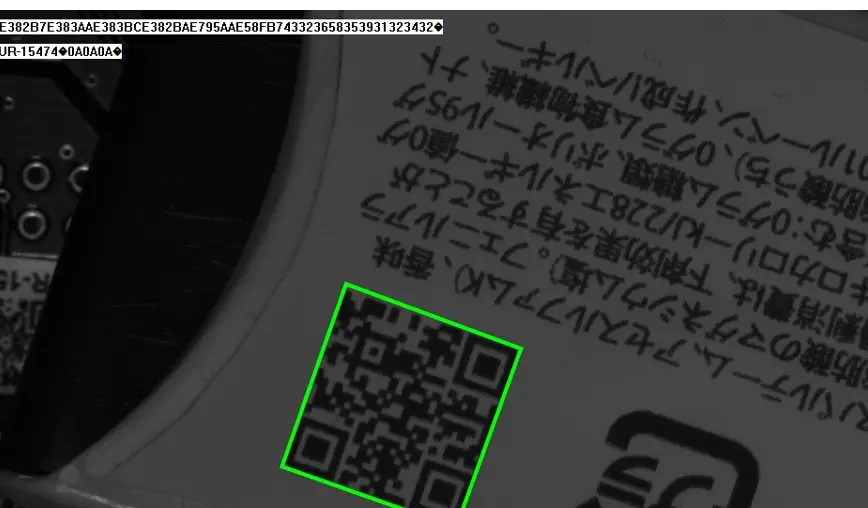
Automatic Extensive Decoding
The following code types are supported:
- Data: Kanji, numeric, alphanumeric, byte and mixed FNC1
- Model 1 QR Codes, all versions (1-14), all levels
- Model 2 QR Codes, all versions (1-40), all levels
- GS1 symbology
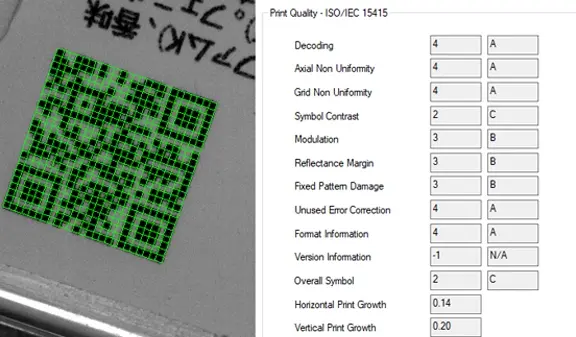
Print Quality Verification
EasyQRCode inspects the quality of the QR code and computes indicators as defined by the ISO/IEC 15415 and ISO/IEC TR 29158 standards.
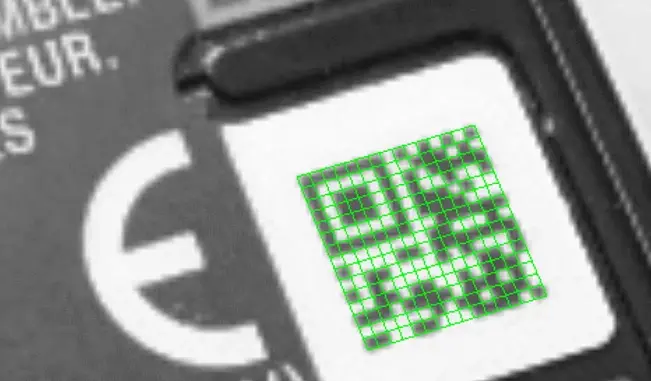
Also For Micro QRCodes
Open eVision can also detect and decode Micro QR Codes using its EQRCodeReader class. A more compact version of the regular QR Code, used when less data need to be encoded. Check it with the latest revision of Open eVision Studio & sample programs.
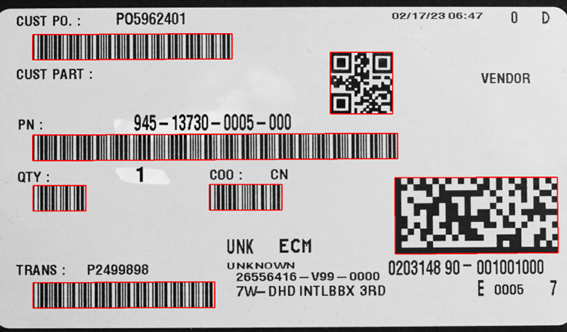
ECodeReader: More Codes In One Scan
ECodeReader simplifies the process of reading multiple codes and types within the same image by integrating EasyMatrixCode2, EasyBarCode2 and EasyQRCode into a single, simple, and unified interface. In some applications, reading multiple code types is a requirement. Doing so, required until now, the use of multiple Code Readers (i.e. one per code type). ECodeReader simplifies that process by integrating the power of EasyMatrixCode2, EasyBarCode2 and EasyQRCode into a single, simple, and unified interface. With ECodeReader, you can thus read Barcodes, Data Matrix codes and QR codes with a single method call. Note: ECodeReader requires the EasyMatrixCode, EasyBarCode and EasyQRCode licenses.
Other Benefits
Neo Licensing System
Neo is the new Licensing System. It is reliable, state-of-the-art, and is now available to store Open eVision and eGrabber licenses. Neo allows you to choose where to activate your licenses, either on a Neo Dongle or in a Neo Software Container. You buy a license, you decide later.
Neo Dongles offer a sturdy hardware and provide the flexibility to be transferred from a computer to another. Neo Software Containers do not need any dedicated hardware, and instead are linked to the computer on which they have been activated.
Neo ships with its own, dedicated Neo License Manager which comes in two flavours: an intuitive, easy to use, Graphical User Interface and a Command Line Interface that allows for easy automation of Neo licensing procedures.
All Open eVision Libraries For Windows And Linux
- Microsoft Windows 11, 10 for x86-64 (64-bit) processor architecture
- Microsoft Windows 11, 10 IoT Enterprise on x86_64 systems
- Linux for x86-64 (64-bit) and ARMv8-A (64-bit) processor architectures with a glibc version greater or equal to 2.18
DPM - Direct Part Marks
EasyQRCode algorithms have been specifically optimized to read direct part marks. They support the low contrast and distorted codes resulting from dot peening, laser marking, ink jet printing or electro-chemical etching on various materials.
Open eVision Studio
Open eVision Studio is the evaluation, prototyping and development tool of Open eVision.
Its intuitive graphical user interface allows you to call and immediately see the result of any of eVision’s 2D image processing functions. A scripting functionality generates the corresponding code, which can then be copied and pasted into your application.
Open eVision Studio is free (when using Open eVision 2.0 and above) and does not require any license.

Software
- Host PC Operating System
-
Open eVision is a set of 64-bit libraries that require an Intel compatible processor with the SSE4 instruction set or an ARMv8-A compatible processor.
Open eVision can be used on the following operating systems:
Microsoft Windows 11, 10 for x86-64 (64-bit) processor architecture
Microsoft Windows 11, 10 IoT Enterprise for x86-64 systems
Linux for x86-64 (64-bit) and ARMv8-A (64-bit) processor architectures with a glibc version greater or equal to 2.18
Remote connections
Remote connections are allowed using remote desktop, TeamViewer or any other similar software.
Virtual machines
Virtual machines are supported. Microsoft Hyper-V, Oracle VirtualBox and libvirt hypervisors have been successfully tested.
Only the Neo Licensing System is compatible with virtualization.
Minimum requirements:
2 GB RAM to run an Open eVision application
8 GB RAM to compile an Open eVision application
Between 100 MB and 2 GB free hard disk space for libraries, depending on selected options.
- APIs
-
Supported programming languages :
The Open eVision libraries and tools support C++, Python and the programming languages compatible with the .NET (C#, VB.NET)
C++ requirements: A compiler compatible with the C++ 11 standard is required to use Open eVision
Python requirements: Python 3.11 or later is required to use the Python bindings for Open eVision
.NET requirements: .NET framework 4.8 (or later) or the .NET platform 6.0 (or later) are supported
Supported Integrated Development Environments:
Microsoft Visual Studio 2017 (C++, C#, VB .NET, C++/CLI)
Microsoft Visual Studio 2019 (C++, C#, VB .NET, C++/CLI)
Microsoft Visual Studio 2022 (C++, C#, VB .NET, C++/CLI)
QtCreator 4.15 with Qt 5.12
Ordering Information
- Product status
-
Released
- Product code - Description
-
PC4175 Open EasyQRCode for USB dongle
PC4325 Open eVision EasyQRCode
- Related products
-
PC6512 eVision/Open eVision USB Dongle (empty)
PC6514 Neo USB Dongle (empty)