


- Image segmentation based on the gray scale of connected objects
- Object labeling
- Geometric feature extraction
- Flexible Masks
- High performance, especially for large images and images with numerous objects
Description
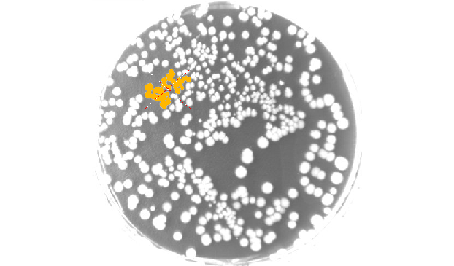
The EasyObject library handles image segmentation, i.e. the decomposition of images into separate objects, also called blobs. Once the objects have been constructed, they can be handled as independent entities. Various geometric parameters or features, such as area, width, or ellipse of inertia, can be computed for each object. Objects of interest can be selected by means of their position or of their computed features. EasyObject also supports the inspection of holes in defined objects. Holes are managed as the objects themselves, benefiting from the same geometrical features. EasyObject manages the relationship between objects and holes, defining parent objects for holes.
Flexible Masks
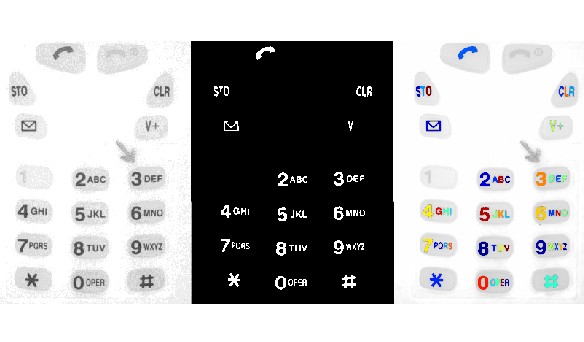
EasyObject supports the limitation of the blob analysis to complex- or disconnected-shape regions of the image thanks to the Flexible Masks that are available for the encoding functions. EasyImage can also generate Flexible Masks from an encoded image.
Functions
Image Encoding
- Construction of the runs: Segmentation using Grayscale single threshold, Grayscale double threshold, Color single threshold, Color range threshold, Reference image, Image range, Labeled Image or Binary Image
- Pixel aggregation
- Object construction: aggregation of the runs into objects
- Hole construction: aggregation of the runs into holes
- Continuous mode for web inspection applications using line-scan cameras
Object feature extraction (geometric parameters computation)
Object selection and sorting (according to any feature value)
Object/Blob Features Available
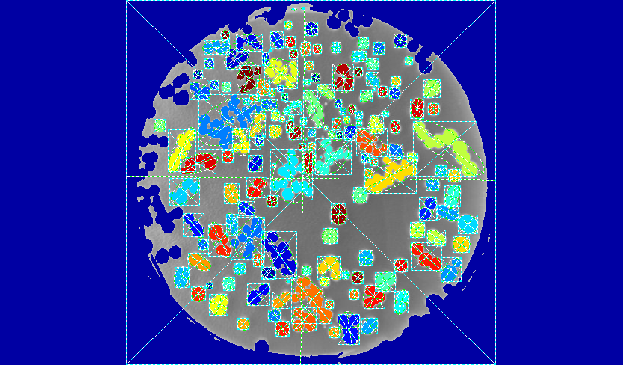
- Position: Limit (top, bottom, left, right), Gravity center (X and Y), Weighted gravity center (X and Y)
- Extent: Area (pixel count), Feret box (center X and Y, height, width with distinct orientation angles at 22, 45, 68 degrees), Bounding box (center X and Y, height, width), Minimum enclosing rectangle (angle, center X and Y, height, width)
- Starting point of the object contour (X and Y)
- Longest run
- Run count
- Object number (index)
- Statistics: Pixel gray-level value (average, deviation, variance, min and max)
- Ellipse of Inertia: Eccentricity of the ellipse of inertia, Ellipse, Second order geometric moments
- Convex hull
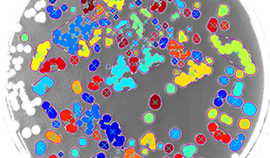
Graphic Representation
The objects can be drawn onto the source image. The following blob features have a pre-set graphical representation:
- Objects
- Diagonals
- Bounding box
- Convex hull
- Ellipse
- Feret Box
- Feret box with an angle of 22°
- Feret box with an angle of 45°
- Feret box with an angle of 68°
- Gravity center
- Minimum enclosing rectangle
- Weighted gravity center
Other Benefits
Neo Licensing System
Neo is the new Licensing System. It is reliable, state-of-the-art, and is now available to store Open eVision and eGrabber licenses. Neo allows you to choose where to activate your licenses, either on a Neo Dongle or in a Neo Software Container. You buy a license, you decide later.
Neo Dongles offer a sturdy hardware and provide the flexibility to be transferred from a computer to another. Neo Software Containers do not need any dedicated hardware, and instead are linked to the computer on which they have been activated.
Neo ships with its own, dedicated Neo License Manager which comes in two flavours: an intuitive, easy to use, Graphical User Interface and a Command Line Interface that allows for easy automation of Neo licensing procedures.
All Open eVision Libraries For Windows And Linux
- Microsoft Windows 11, 10 for x86-64 (64-bit) processor architecture
- Microsoft Windows 11, 10 IoT Enterprise on x86_64 systems
- Linux for x86-64 (64-bit) and ARMv8-A (64-bit) processor architectures with a glibc version greater or equal to 2.18
Open eVision Studio
Open eVision Studio is the evaluation, prototyping and development tool of Open eVision.
Its intuitive graphical user interface allows you to call and immediately see the result of any of eVision’s 2D image processing functions. A scripting functionality generates the corresponding code, which can then be copied and pasted into your application.
Open eVision Studio is free (when using Open eVision 2.0 and above) and does not require any license.


Software
- Host PC Operating System
-
Open eVision is a set of 64-bit libraries that require an Intel compatible processor with the SSE4 instruction set or an ARMv8-A compatible processor.
Open eVision can be used on the following operating systems:
Microsoft Windows 11, 10 for x86-64 (64-bit) processor architecture
Microsoft Windows 11, 10 IoT Enterprise for x86-64 systems
Linux for x86-64 (64-bit) and ARMv8-A (64-bit) processor architectures with a glibc version greater or equal to 2.18
Remote connections
Remote connections are allowed using remote desktop, TeamViewer or any other similar software.
Virtual machines
Virtual machines are supported. Microsoft Hyper-V, Oracle VirtualBox and libvirt hypervisors have been successfully tested.
Only the Neo Licensing System is compatible with virtualization.
Minimum requirements:
2 GB RAM to run an Open eVision application
8 GB RAM to compile an Open eVision application
Between 100 MB and 2 GB free hard disk space for libraries, depending on selected options.
- APIs
-
Supported programming languages :
The Open eVision libraries and tools support C++, Python and the programming languages compatible with the .NET (C#, VB.NET)
C++ requirements: A compiler compatible with the C++ 11 standard is required to use Open eVision
Python requirements: Python 3.11 or later is required to use the Python bindings for Open eVision
.NET requirements: .NET framework 4.8 (or later) or the .NET platform 6.0 (or later) are supported
Supported Integrated Development Environments:
Microsoft Visual Studio 2017 (C++, C#, VB .NET, C++/CLI)
Microsoft Visual Studio 2019 (C++, C#, VB .NET, C++/CLI)
Microsoft Visual Studio 2022 (C++, C#, VB .NET, C++/CLI)
QtCreator 4.15 with Qt 5.12
Ordering Information
- Product status
-
Released
- Product code - Description
-
PC4152 Open EasyObject for USB dongle
PC4302 Open eVision EasyObject
- Related products
-
PC6512 eVision/Open eVision USB Dongle (empty)
PC6514 Neo USB Dongle (empty)