



- Unsupervised mode: train only with “good” images to detect and segment anomalies and defects in new images
- Supervised mode: learn a model of the defects for better segmentation and detection precision
- Works with any image resolution
- Supports data augmentation and masks
- Compatible with CPU and GPU processing
- Includes the free Deep Learning Studio application for dataset creation, training and evaluation
- Available as part of the Deep Learning Bundle
- Also as cost effective inference-only license
Description
-
EasySegment is the segmentation tool of Deep Learning Bundle. EasySegment performs defect detection and segmentation. It identifies parts that contain defects, and precisely pinpoints where they are in the image.
-
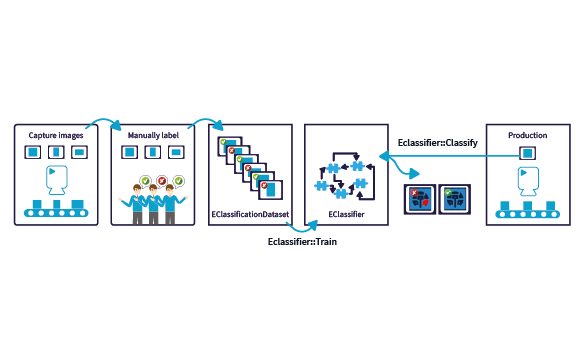
The supervised mode of EasySegment works by learning a model of what is a defect and what is a “good” part in an image. This is done by training with images annotated with the expected segmentation. Then, the tool can be used to detect and segment the defects in new images.
-
The supervised mode of EasySegment achieves better precision and can segment more complex defects than the unsupervised mode thanks to the knowledge of the expected segmentation.
-
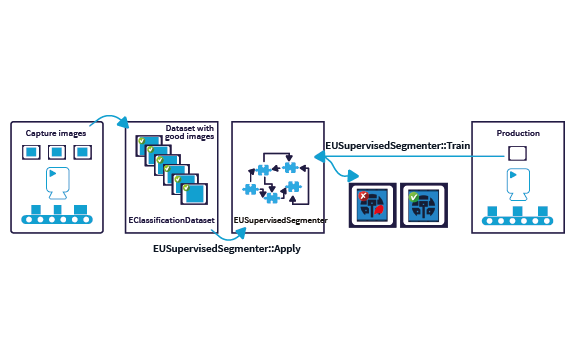
The unsupervised mode of EasySegment works by learning a model of what is a “good” sample (i.e. a sample without any defect). This is done by training it only with images of “good” samples.
-
Then, the tool can be used to classify new images as good or defective and segment the defects from these images. By training only with images of good samples, the unsupervised mode of EasySegment is able to perform inspection even when the type of defect is not known beforehand or when defective samples are not readily available.
What Is Deep Learning?
Neural Networks are computing systems inspired by the biological neural networks that constitute the human brain. Convolutional Neural Networks (CNN) are a class of deep, feed-forward artificial neural networks, most commonly applied to analyzing images. Deep Learning uses large CNNs to solve complex problems difficult or impossible to solve with so-called conventional computer vision algorithms. Deep Learning algorithms may be easier to use as they typically learn by example. They do not require the user to figure out how to classify or inspect parts. Instead, in an initial training phase, they learn just by being shown many images of the parts to be inspected. After successful training, they can be used to classify parts, or detect and segment defects.
What Is EasySegment Good For?
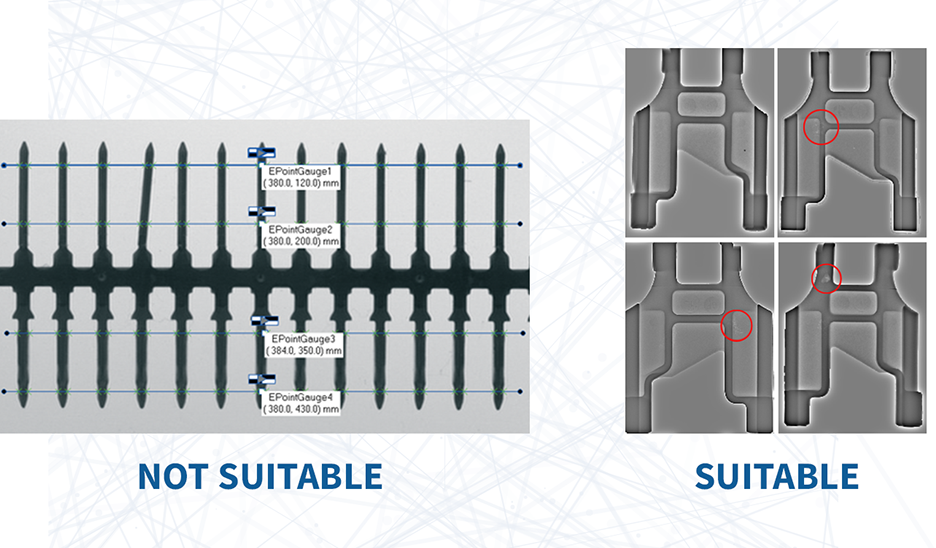
Deep Learning is generally not suitable for applications requiring precise measurement or gauging. It is also not recommended when some types of errors (such as false negative) are completely unacceptable. The unsupervised mode of EasySegment is good for defect detection and segmentation tasks, especially when defectives samples are hard to come by. Deep Learning tools usually work very well with images of natural or manufactured objects that have complex surface patterns (e.g. wood, fabric, …) that make the detection of defects by conventional machine vision algorithm very hard. Besides, the "learn by example" paradigm of Deep Learning can also reduce the development time of a computer vision process.
EasySegment Supervised Mode
EasySegment is the segmentation tool of Deep Learning Bundle. EasySegment performs defect detection and segmentation. It identifies parts that contain defects, and precisely pinpoints where they are in the image. The supervised mode of EasySegment works by learning a model of what is a defect and what is a “good” part in an image. This is done by training with images annotated with the expected segmentation. Then, the tool can be used to detect and segment the defects in new images. The supervised mode of EasySegment achieves better precision and can segment more complex defects than the unsupervised mode thanks to the knowledge of the expected segmentation.
EasySegment Unsupervised Mode
EasySegment is the segmentation tool of Deep Learning Bundle. EasySegment performs defect detection and segmentation. It identifies parts that contain defects, and precisely pinpoints where they are in the image. The unsupervised mode of EasySegment works by learning a model of what is a “good” sample (i.e. a sample without any defect). This is done by training it only with images of “good” samples. Then, the tool can be used to classify new images as good or defective and segment the defects from these images. By training only with images of good samples, the unsupervised mode of EasySegment is able to perform inspection even when the type of defect is not known beforehand or when defective samples are not readily available.
Cost-Effective Inference License
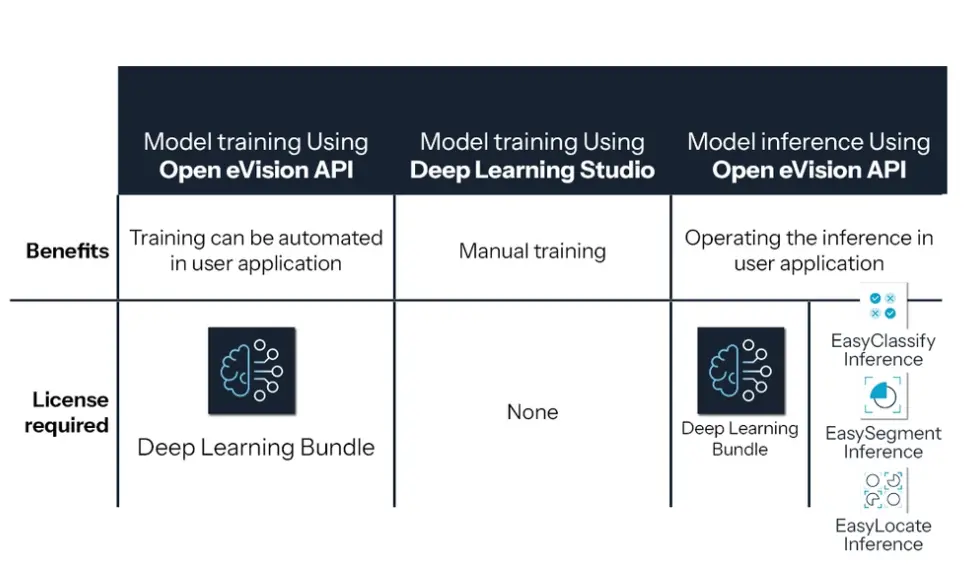
Usually , deploying Deep Learning on the production floor only requires inference processing. Inference is the process of using a previously trained model to inspect, analyze newly acquired images. The training is, in most contexts, an offline process. Training can be executed using the Open eVision API and requires a license of the Deep Learning Bundle. Alternatively, training can also be performed, free of charge, with the Deep Learning Studio application. Inference-only licenses are an alternative to the Deep Learning Bundle license, allowing the customer to deploy cost-optimized deep learning solutions.
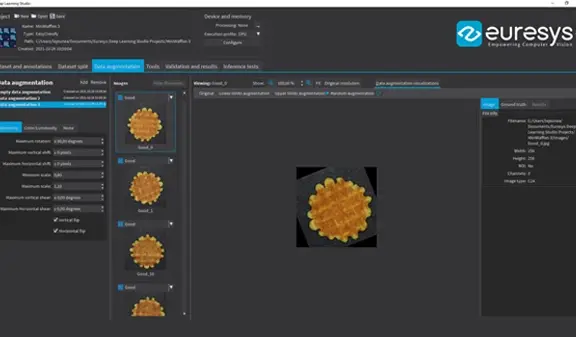
Data Augmentation
Deep Learning works by training a neural network, teaching it how to classify a set of reference images. The performance of the process highly depends on how representative and extensive the set of reference images is. Deep Learning Bundle implements “data augmentation”, which creates additional reference images by modifying (for example by shifting, rotating, scaling) existing reference images within programmable limits. This allows Deep Learning Bundle to work with as few as one hundred training images per class.

Performance
Deep Learning generally requires significant amounts of processing power, especially during the learning phase. Deep Learning Bundle supports standard CPUs and automatically detects Nvidia CUDA-compatible GPUs in the PC. Using a single GPU typically accelerates the learning and the processing phases by a factor of 100.
Other Benefits
Neo Licensing System
Neo is the new Licensing System. It is reliable, state-of-the-art, and is now available to store Open eVision and eGrabber licenses. Neo allows you to choose where to activate your licenses, either on a Neo Dongle or in a Neo Software Container. You buy a license, you decide later.
Neo Dongles offer a sturdy hardware and provide the flexibility to be transferred from a computer to another. Neo Software Containers do not need any dedicated hardware, and instead are linked to the computer on which they have been activated.
Neo ships with its own, dedicated Neo License Manager which comes in two flavours: an intuitive, easy to use, Graphical User Interface and a Command Line Interface that allows for easy automation of Neo licensing procedures.
All Open eVision Libraries For Windows And Linux
- Microsoft Windows 11, 10 for x86-64 (64-bit) processor architecture
- Microsoft Windows 11, 10 IoT Enterprise on x86_64 systems
- Linux for x86-64 (64-bit) and ARMv8-A (64-bit) processor architectures with a glibc version greater or equal to 2.18
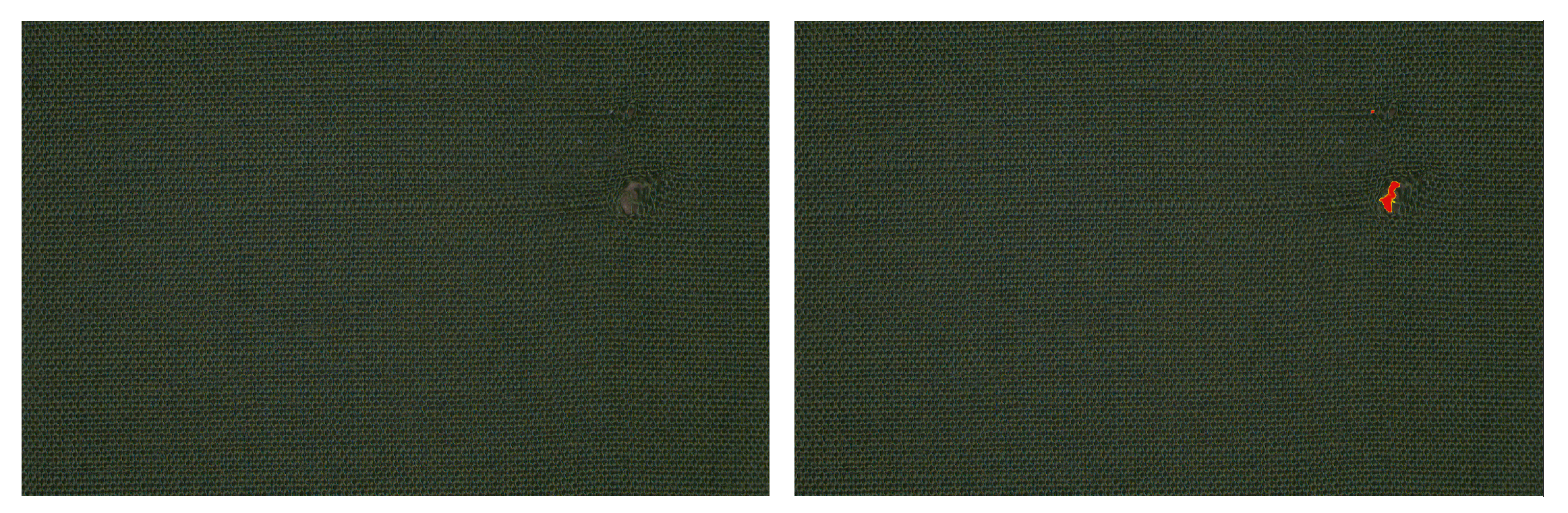
Sample Dataset: Fabric Defect Detection
Our “Fabric” sample dataset shows how the unsupervised mode of EasySegment can be used to detect and segment defects in Fabric with only a few good samples for training and no knowledge about what kind of defects are expected. Moreover, the unsupervised mode of EasySegment can be used to ease the annotation of the expected segmentation required for the supervised mode by reviewing and importing the results of the unsupervised mode as ground truth.
Sample Dataset: Foreign Material Detection And Segmentation
Our “Coffee” sample dataset shows how the supervised mode of EasySegment can be used to efficiently detect and segment foreign materials on a production line, even when the foreign materials’ color and texture are very close to the product of interest.

Open eVision Deep Learning Studio
Open eVision includes the free Deep Learning Studio application. This application assists the user during the creation of the dataset as well as the training and testing of the deep learning tool. For EasySegment, Deep Learning Studio integrates an annotation tool and can transform prediction into ground truth annotation. It also allows to graphically configure the tool to fit performance requirements. For example, after training, one can choose a tradeoff between a better defect detection rate or a better good detection rate.

Software
- Host PC Operating System
-
Open eVision is a set of 64-bit libraries that require an Intel compatible processor with the SSE4 instruction set or an ARMv8-A compatible processor.
Open eVision can be used on the following operating systems:
Microsoft Windows 11, 10 for x86-64 (64-bit) processor architecture
Microsoft Windows 11, 10 IoT Enterprise for x86-64 systems
Linux for x86-64 (64-bit) and ARMv8-A (64-bit) processor architectures with a glibc version greater or equal to 2.18
Remote connections
Remote connections are allowed using remote desktop, TeamViewer or any other similar software.
Virtual machines
Virtual machines are supported. Microsoft Hyper-V, Oracle VirtualBox and libvirt hypervisors have been successfully tested.
Only the Neo Licensing System is compatible with virtualization.
Minimum requirements:
2 GB RAM to run an Open eVision application
8 GB RAM to compile an Open eVision application
Between 100 MB and 2 GB free hard disk space for libraries, depending on selected options.
- APIs
-
Supported programming languages :
The Open eVision libraries and tools support C++, Python and the programming languages compatible with the .NET (C#, VB.NET)
C++ requirements: A compiler compatible with the C++ 11 standard is required to use Open eVision
Python requirements: Python 3.11 or later is required to use the Python bindings for Open eVision
.NET requirements: .NET framework 4.8 (or later) or the .NET platform 6.0 (or later) are supported
Supported Integrated Development Environments:
Microsoft Visual Studio 2017 (C++, C#, VB .NET, C++/CLI)
Microsoft Visual Studio 2019 (C++, C#, VB .NET, C++/CLI)
Microsoft Visual Studio 2022 (C++, C#, VB .NET, C++/CLI)
QtCreator 4.15 with Qt 5.12
Ordering Information
- Product status
-
Released
- Product code - Description
-
PC4188 Open EasySegment for USB dongle
PC4338 Open eVision EasySegment
PC4193 Open EasySegment Inference for USB dongle
PC4343 Open eVision EasySegment Inference
- Related products
-
PC4182 Open Deep Learning Bundle for USB dongle
PC4332 Open eVision Deep Learning Bundle